# Fara-7B: An Efficient Agentic Model for Computer Use
[](https://aka.ms/msaif/fara)

[](https://huggingface.co/microsoft/Fara-7b)
[](https://aka.ms/foundry-fara-7b)
[](https://huggingface.co/datasets/microsoft/WebTailBench)

---
## Overview
**Fara-7B** is Microsoft's first **agentic small language model (SLM)** designed specifically for computer use. With only 7 billion parameters, Fara-7B is an ultra-compact Computer Use Agent (CUA) that achieves state-of-the-art performance within its size class and is competitive with larger, more resource-intensive agentic systems.
Try Fara-7B locally as follows (see [Installation](##Installation) for detailed instructions):
```bash
# 1. Clone repository
git clone https://github.com/microsoft/fara.git
cd fara
# 2. Setup environment
python3 -m venv .venv
source .venv/bin/activate
pip install -e .
playwright install
```
Then in one process, host the model:
```bash
vllm serve "microsoft/Fara-7B" --port 5000 --dtype auto
```
Then you can iterative query it with:
```bash
fara-cli --task "whats the weather in new york now"
```
Hint: might need to do `--tensor-parallel-size 2` with vllm command if you run out of memory
### What Makes Fara-7B Unique
Unlike traditional chat models that generate text-based responses, Fara-7B leverages computer interfaces—mouse and keyboard—to perform multi-step tasks on behalf of users. The model:
- **Operates visually** by perceiving webpages and taking actions like scrolling, typing, and clicking on directly predicted coordinates
- **Uses the same modalities as humans** to interact with computers—no accessibility trees or separate parsing models required
- **Enables on-device deployment** due to its compact 7B parameter size, resulting in reduced latency and improved privacy as user data remains local
- **Completes tasks efficiently**, averaging only ~16 steps per task compared to ~41 for comparable models
Fara-7B is trained using a novel synthetic data generation pipeline built on the [Magentic-One](https://www.microsoft.com/en-us/research/articles/magentic-one-a-generalist-multi-agent-system-for-solving-complex-tasks/) multi-agent framework, with 145K trajectories covering diverse websites, task types, and difficulty levels. The model is based on [Qwen2.5-VL-7B](https://arxiv.org/abs/2502.13923) and trained with supervised fine-tuning.
### Key Capabilities
Fara-7B can automate everyday web tasks including:
- Searching for information and summarizing results
- Filling out forms and managing accounts
- Booking travel, movie tickets, and restaurant reservations
- Shopping and comparing prices across retailers
- Finding job postings and real estate listings
### Performance Highlights
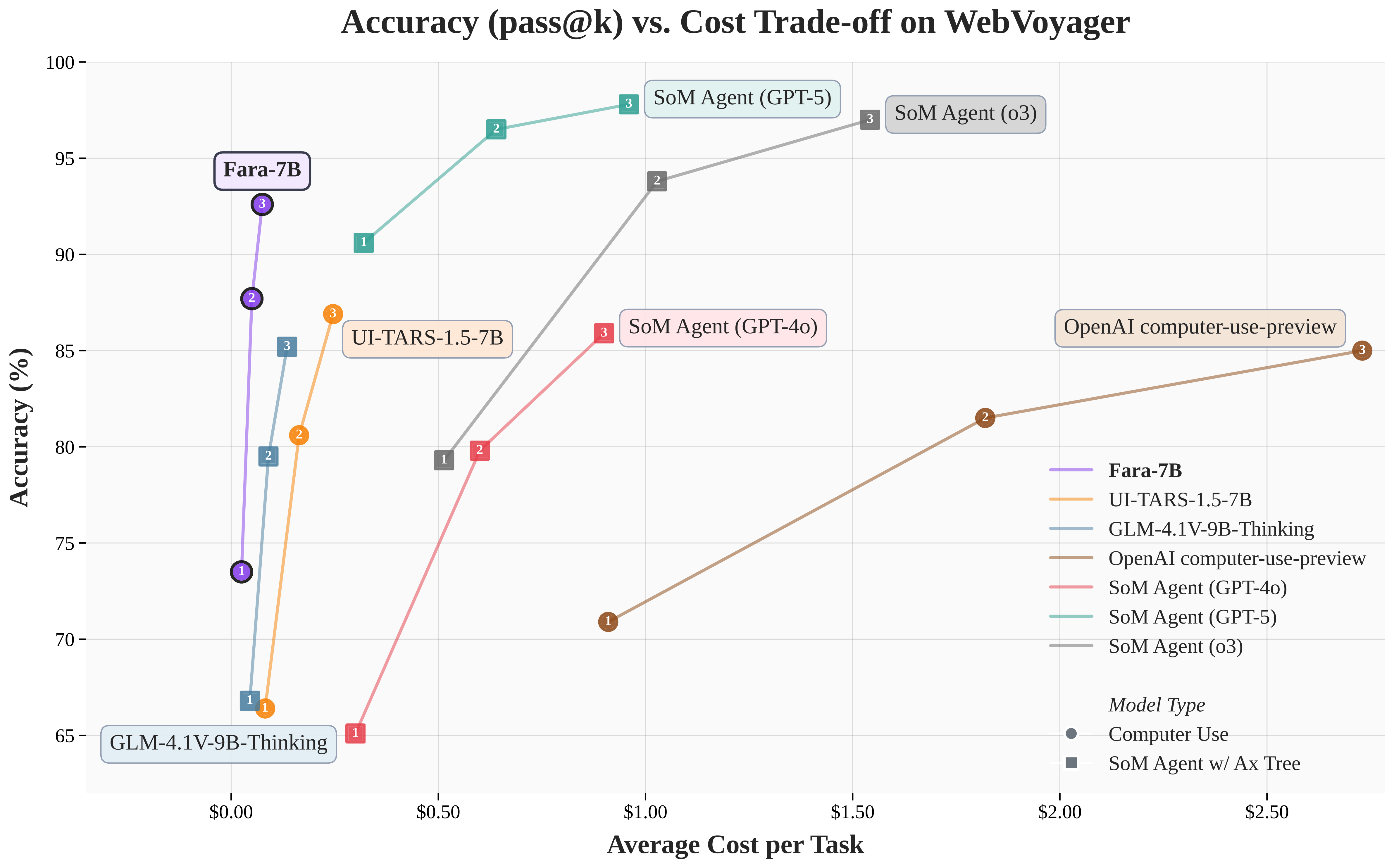
Fara-7B achieves state-of-the-art results across multiple web agent benchmarks, outperforming both comparable-sized models and larger systems:
| Model | Params | WebVoyager | Online-M2W | DeepShop | WebTailBench |
|-------|--------|------------|------------|----------|--------------|
| **SoM Agents** | | | | | |
| SoM Agent (GPT-4o-0513) | - | 90.6 | 57.7 | 49.1 | 60.4 |
| SoM Agent (o3-mini) | - | 79.3 | 55.4 | 49.7 | 52.7 |
| SoM Agent (GPT-4o) | - | 65.1 | 34.6 | 16.0 | 30.8 |
| GLM-4.1V-9B-Thinking | 9B | 66.8 | 33.9 | 32.0 | 22.4 |
| **Computer Use Models** | | | | | |
| OpenAI computer-use-preview | - | 70.9 | 42.9 | 24.7 | 25.7 |
| UI-TARS-1.5-7B | 7B | 66.4 | 31.3 | 11.6 | 19.5 |
| **Fara-7B** | **7B** | **73.5** | **34.1** | **26.2** | **38.4** |
*Table: Online agent evaluation results showing success rates (%) across four web benchmarks. Results are averaged over 3 runs.*
### WebTailBench: A New Benchmark for Real-World Web Tasks
We are releasing **[WebTailBench](https://huggingface.co/datasets/microsoft/WebTailBench)**, a new evaluation benchmark focusing on 11 real-world task types that are underrepresented or missing in existing benchmarks. The benchmark includes 609 tasks across diverse categories, with the first 8 segments testing single skills or objectives (usually on a single website), and the remaining 3 evaluating more difficult multi-step or cross-site tasks.
#### WebTailBench Detailed Results
| Task Segment | Tasks | SoM GPT-4o-0513 | SoM o3-mini | SoM GPT-4o | GLM-4.1V-9B | OAI Comp-Use | UI-TARS-1.5 | **Fara-7B** |
|--------------|-------|-----------------|-------------|------------|-------------|--------------|-------------|-------------|
| **Single-Site Tasks** |
| Shopping | 56 | 62.5 | 71.4 | 38.1 | 31.0 | 42.3 | 41.1 | **52.4** |
| Flights | 51 | 60.1 | 39.2 | 11.1 | 10.5 | 17.6 | 10.5 | **37.9** |
| Hotels | 52 | 68.6 | 56.4 | 31.4 | 19.9 | 26.9 | 35.3 | **53.8** |
| Restaurants | 52 | 67.9 | 59.6 | 47.4 | 32.1 | 35.9 | 22.4 | **47.4** |
| Activities | 80 | 70.4 | 62.9 | 41.7 | 26.3 | 30.4 | 9.6 | **36.3** |
| Ticketing | 57 | 58.5 | 56.7 | 37.4 | 35.7 | 49.7 | 30.4 | **38.6** |
| Real Estate | 48 | 34.0 | 17.4 | 20.1 | 16.0 | 9.0 | 9.7 | **23.6** |
| Jobs/Careers | 50 | 49.3 | 44.0 | 32.7 | 22.7 | 20.7 | 20.7 | **28.0** |
| **Multi-Step Tasks** |
| Shopping List (2 items) | 51 | 66.0 | 62.7 | 17.0 | 7.8 | 34.0 | 20.9 | **49.0** |
| Comparison Shopping | 57 | 67.3 | 59.1 | 27.5 | 22.8 | 1.2 | 8.8 | **32.7** |
| Compositional Tasks | 55 | 51.5 | 39.4 | 26.7 | 17.0 | 10.3 | 9.1 | **23.0** |
| **Overall** |
| Macro Average | 609 | 59.7 | 51.7 | 30.1 | 22.0 | 25.3 | 19.9 | **38.4** |
| Micro Average | 609 | 60.4 | 52.7 | 30.8 | 22.4 | 25.7 | 19.5 | **38.4** |
*Table: Breakdown of WebTailBench results across all 11 segments. Success rates (%) are averaged over 3 independent runs. Fara-7B achieves the highest performance among computer-use models across all task categories.*
**Coming Soon:**
- Task Verification pipeline for LLM-as-a-judge evaluation
- Official human annotations of WebTailBench (in partnership with BrowserBase)
### Evaluation Infrastructure
Our evaluation setup leverages:
1. **Playwright** - A cross-browser automation framework that replicates browser environments
2. **Abstract Web Agent Interface** - Allows integration of any model from any source into the evaluation environment
3. **Fara-Agent Class** - Reference implementation for running the Fara model
> **Note:** Fara-7B is an experimental release designed to invite hands-on exploration and feedback from the community. We recommend running it in a sandboxed environment, monitoring its execution, and avoiding sensitive data or high-risk domains.
---
## Installation
Install the package using either UV or pip:
```bash
uv sync --all-extras
```
or
```bash
pip install -e .
```
Then install Playwright browsers:
```bash
playwright install
```
---
## Hosting the Model
**Recommended:** The easiest way to get started is using Azure Foundry hosting, which requires no GPU hardware or model downloads. Alternatively, you can self-host with VLLM if you have GPU resources available.
### Azure Foundry Hosting (Recommended)
Deploy Fara-7B on [Azure Foundry](https://ai.azure.com/explore/models/Fara-7B/version/2/registry/azureml-msr) without needing to download weights or manage GPU infrastructure.
**Setup:**
1. Deploy the Fara-7B model on Azure Foundry and obtain your endpoint URL and API key
2. Add your endpoint details to the existing `endpoint_configs/` directory (example configs are already provided):
```bash
# Edit one of the existing config files or create a new one
# endpoint_configs/fara-7b-hosting-ansrz.json (example format):
{
"model": "Fara-7B",
"base_url": "https://your-endpoint.inference.ml.azure.com/",
"api_key": "YOUR_API_KEY_HERE"
}
```
3. Run the Fara agent:
```bash
fara-cli --task "how many pages does wikipedia have" --start_page "https://www.bing.com"
```
That's it! No GPU or model downloads required.
### Self-hosting with VLLM
If you have access to GPU resources, you can self-host Fara-7B using VLLM. This requires a GPU machine with sufficient VRAM.
All that is required is to run the following command to start the VLLM server:
```bash
vllm serve "microsoft/Fara-7B" --port 5000 --dtype auto
```
### Testing the Fara Agent
Run the test script to see Fara in action:
```bash
fara-cli --task "how many pages does wikipedia have" --start_page "https://www.bing.com" --endpoint_config endpoint_configs/azure_foundry_config.json [--headful] [--downloads_folder "/path/to/downloads"] [--save_screenshots] [--max_rounds 100] [--browserbase]
```
In self-hosting scenario the `endpoint_config` points to `endpoint_configs/vllm_config.json` from the VLLM server above.
If you set `--browserbase`, export environment variables for the API key and project ID.
#### Expected Output
```
Initializing Browser...
Browser Running... Starting Fara Agent...
##########################################
Task: how many pages does wikipedia have
##########################################
Running Fara...
Thought #1: To find the current number of Wikipedia pages, I'll search for the latest Wikipedia page count statistics.
Action #1: executing tool 'web_search' with arguments {"action": "web_search", "query": "Wikipedia total number of articles"}
Observation#1: I typed 'Wikipedia total number of articles' into the browser search bar.
Thought #2: Wikipedia currently has 7,095,446 articles.
Action #2: executing tool 'terminate' with arguments {"action": "terminate", "status": "success"}
Observation#2: Wikipedia currently has 7,095,446 articles.
Final Answer: Wikipedia currently has 7,095,446 articles.
Enter another task (or press Enter to exit):
```
---
# Reproducibility
We provide a framework in `webeval/` to reproduce our results on WebVoyager and OnlineMind2Web.
Agentic evaluations on live websites present unique challenges due to day-to-day changes. We implement several measures to ensure reliable and comparable evaluations:
**BrowserBase Integration**
We employ BrowserBase to manage browser session hosting, enabling reliable browser instance management.
**Time-sensitive Task Updates**
Tasks in benchmarks like WebVoyager can become stale or impossible. We:
- Removed ~48 impossible tasks from the original WebVoyager benchmark
- Updated ~50 tasks with future dates to keep them achievable
- Example: *"Search for a hotel in Bali from Jan 1 to Jan 4, 2024"* → *"Search for a hotel in Bali from Jan 1 to Jan 4, 2026"*
- Our updated WebVoyager benchmark is available at `webeval/data/webvoyager/WebVoyager_data_08312025.jsonl`
**Environment Error Handling**
Browser errors (connection drops, page timeouts) are handled robustly:
- Trajectories are retried up to 5 times when environment errors occur
- Complete yet incorrect trajectories are never retried
- Each retry starts with a fresh browser session, with no retained state
**Step Budget**
Each trajectory is capped at a maximum of 100 actions across all online benchmarks. Trajectories exceeding this budget without choosing to stop are considered incorrect.
## WebEval Package Installation
```bash
conda create --name fara_webeval python=3.12
conda activate fara_webeval
# Install fara package
pip install -e .
# Install autogen submodule
git submodule update --init --recursive
cd autogen/python/packages
pip install -e autogen-core
pip install -e autogen-ext
# Install webeval
cd webeval
pip install -e .
# Install playwright
playwright install
```
## Running Evaluations
Navigate to the scripts directory:
```bash
cd webeval/scripts
```
Make sure you set a valid OpenAI GPT-4o endpoint in `endpoint_configs_gpt4o/dev` in order to run the WebVoyager LLM-as-a-judge!
**Option 1: Self-hosted VLLM**
```bash
python webvoyager.py --model_url /path/where/you/want/to/download/model/ --model_port 5000 --eval_oai_config ../endpoint_configs_gpt4o/dev/ --out_url /path/to/save/eval/files --device_id 0,1 --processes 1 --run_id 1 --max_rounds 100
```
**Option 2: Azure Foundry Deployment**
Deploy [Fara-7B on Foundry endpoint(s)](https://ai.azure.com/explore/models/Fara-7B/version/2/registry/azureml-msr), then place endpoint URLs and keys in JSONs under `endpoint_configs/`:
```bash
python webvoyager.py --model_endpoint ../../endpoint_configs/ --eval_oai_config ../endpoint_configs_gpt4o/dev/ --out_url /path/to/save/eval/files --processes 1 --run_id 1_endpoint --max_rounds 100
```
### Notes
- We use the same LLM-as-a-judge prompts and model (GPT-4o) as WebVoyager, hence the `--eval_oai_config` argument
- Set `--browserbase` for browser session management (requires exported API key and project ID environment variables)
- Avoid overloading a single VLLM deployment with more than ~10 concurrent processes due to known issues
- See debugging output in `fara/webeval/scripts/stdout.txt`
---
## Analyzing Evaluation Results
### Evaluation Output Structure
Evaluation results are stored under `--out_url` in folders organized by:
- Model name
- Dataset
- Username
- Run ID
Example path:
```
/runs/WebSurfer-fara-100-max_n_images-3/fara-7b/